CocoReader
LibraryGuidesCompareHow it worksFAQ
Download on the App Store
  1. Home
  2. /Guides
  3. /Read my book to me

An iPhone app that will read my book to me

By Philip D, maker of CocoReader

A plain-English way to listen to a book you already have, on iPhone.

Last updated: 10 November 2026

Free to download · 7-day free trial on annual Pro
iPhone, iOS 26.2+

In short

In short: Yes. CocoReader: Book to Audiobook reads books and docs you own aloud on iPhone — import EPUBs that aren't copy-protected, PDFs, text files, web articles and photos of printed pages — with words highlighting as they're read. Kindle and MOBI store files will not import.

Last verified 10 November 2026.

On this page

  1. The short answer
  2. How to have your iPhone read a book to you
  3. What you can import
  4. What you cannot import
  5. Follow the words while you listen
  6. Limits
  7. FAQ
Back to top
  1. The short answer
  2. How to have your iPhone read a book to you
  3. What you can import
  4. What you cannot import
  5. Follow the words while you listen
  6. Limits
  7. FAQ

The short answer

If you want your iPhone to read a book you own, CocoReader: Book to Audiobook does that. You import the file, pick a voice and press play. Words highlight as they're read aloud.

Import EPUBs that aren't copy-protected, PDFs, text files, web articles and photos of printed pages on iPhone. EPUB on Mac. On iPhone you can also scan printed pages with the camera, type or paste text, and use on-device OCR for photos and image-only PDF pages. You can import from the Share sheet or Safari Open in CocoReader. Links that end in .epub or .pdf import as files.

How to have your iPhone read a book to you

  1. Get CocoReader on iPhoneDownload CocoReader: Book to Audiobook from the App Store. It needs iOS 26.2 or later, and it reads in English.

  2. Import the book you ownTap "Import" and pick an EPUB that isn't copy-protected, a PDF, a text file, a web article or a photo of a printed page. Or download one of the 1,500+ free classics in the app.
  3. Choose a voice and press playOpen the book, pick a voice and tap play. Words highlight as they're read aloud, and listening continues with the screen locked.
Step 1: Get CocoReader on iPhone

Download CocoReader: Book to Audiobook from the App Store. It needs iOS 26.2 or later, and it reads in English.

Step 2: Import the book you own

Tap Import and pick an EPUB that isn't copy-protected, a PDF, a text file, a web article or a photo of a printed page. Or download one of the 1,500+ free classics you can download in the app.

For the full import walkthrough, see how to listen to an EPUB on iPhone.

Step 3: Choose a voice and press play

Open the book, pick a voice and tap play. Words highlight as they're read aloud, and listening continues with the screen locked.

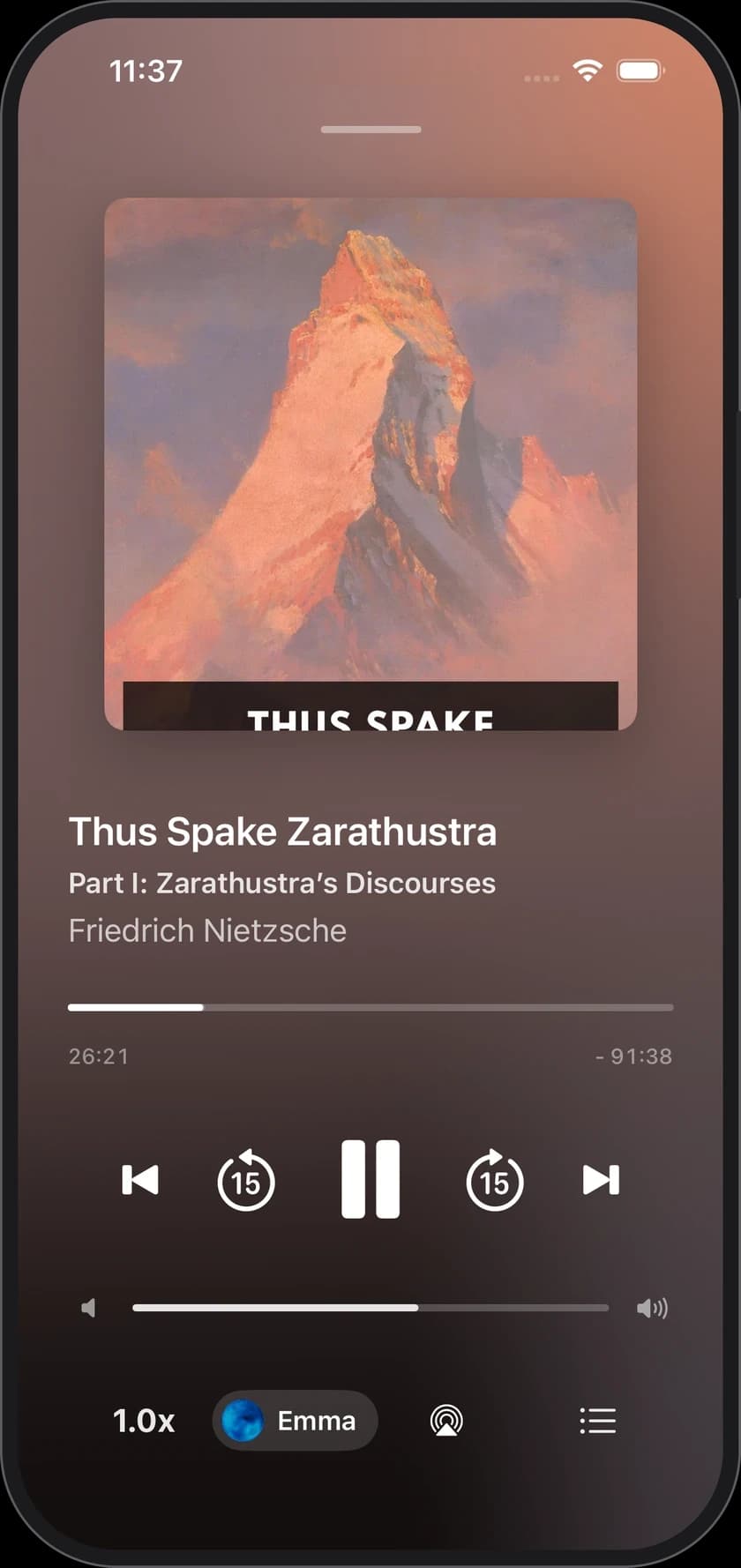
CocoReader player playing Thus Spake Zarathustra with the narrator Emma selected

Listen to a book you already have.

Import a file, pick a voice, press play.

Free to download · 7-day free trial on annual Pro

CocoReader player playing Thus Spake Zarathustra with the narrator Emma selected

What you can import

Import EPUBs that aren't copy-protected, PDFs, text files, web articles and photos of printed pages on iPhone. EPUB on Mac.

On iPhone you can also scan printed pages with the camera, type or paste text, and use on-device OCR for photos and image-only PDF pages. You can import from the Share sheet or Safari Open in CocoReader. Links that end in .epub or .pdf import as files.

Once your voice and books are downloaded, you can listen with no internet connection. See offline text to speech on iPhone.

What you cannot import

Not supported: Word documents (DOCX), MOBI, Kindle formats (AZW, AZW3, KFX), RTF, HTML files, copy-protected EPUBs, and Kindle books.

There is no copy-protection removal in CocoReader. If the file only opens in Kindle or another store app, leave it there and use that app's own tools.

Follow the words while you listen

Words highlight as they're read aloud, so you can read along. That is text to speech on your file — not a human audiobook synced from another store. For the highlighting walkthrough, see read and listen at the same time.

Limits

  • iPhone with iOS 26.2 or later (a Mac early version is available, EPUB only).
  • English only.
  • No Kindle, MOBI or copy-protected EPUB import.

FAQ

Yes. CocoReader: Book to Audiobook imports a book or doc you own on iPhone, chooses a voice and reads it aloud. Words highlight as they're read aloud.

No. Kindle books will not import. Import EPUBs that aren't copy-protected, PDFs, text files, web articles and photos of printed pages on iPhone instead, or use Kindle's own accessibility tools where they are available.

It uses text-to-speech narrator voices on your iPhone, not a separately recorded human audiobook. Choose from 20+ narrator voices on iPhone 12 and later, and set the speed from 0.75x to 2x.

Keep reading

GuideHow to listen to an EPUB on iPhoneImport a book you own and press play. Three steps.Read →GuideRead and listen at the same timeWord-by-word highlighting while the voice reads.Read →Library1,500+ free classicsDownload a Standard Ebooks title in the app and press play.Read →

Let your iPhone read the next chapter.

Or read more about the CocoReader Book to Audiobook app.

Free to download · 7-day free trial on annual Pro

CocoReader player playing Thus Spake Zarathustra with the narrator Emma selected
CocoReader

An audiobook reader for iPhone. Upload your books, then listen.

support@cocoreader.cc
QR code: download CocoReader on the App Store

Get the app

Scan to download
on your iPhone

  • How it works
  • Features
  • Library
  • FAQ
  • iPhone app
  • Mac early version available

  • Pride and Prejudice
  • Frankenstein
  • The Great Gatsby
  • The Adventures of Sherlock Holmes
  • Dracula
  • The Picture of Dorian Gray
  • Wuthering Heights
  • A Christmas Carol
  • All 1,500+ classics →

  • How to listen to your own books
  • Listen to Standard Ebooks classics
  • Text to speech with no internet
  • An app that reads your book to you
  • Read and listen at the same time
  • All guides →

  • Best apps that read your books aloud
  • Speechify alternative
  • Voice Dream alternative
  • Best text to speech apps
  • Best listen-aloud apps at no charge
  • All comparisons →

  • Contact us
  • Email support

  • Privacy Policy
  • Terms of Service
© 2026 CocoReader.Made for listening to the books you own.
Download on the App Store

Free to download · 7-day free trial on annual Pro